Fax Modem Follies
I begin to learn the art of Mammoth Skinning
Yesterday I needed to send a fax, because even though we are 25% of the way through the 21st century, medical practice in the USA is barely out of the 19th.
It was bomb-cycloning here in my sector, so I didn't really want to go to the library to use their fax machine for a donation of $0.25 per page.
But I have a downstairs neighbor who has a landline, and a Xerox multifunction printer/scanner/fax (I have a Brother MFC, alas it has no fax capability).
My Neighbor goes south for Bomb Cyclone Season, but I asked and got permission to go in and use their stuff. Duly scanned, but the fax wouldn't go through.
I tried the number manually from their desk phone, to hear that the service was temporarily disconnected, emergency calls only, which my neighbor had neglected to tell me they do to save money while away.
Time for Plan B.
I went to my storage room, from whence I retrieved a Hayes Optima 144+FAX for PCMCIA with EZjack™ modem. From 1994.
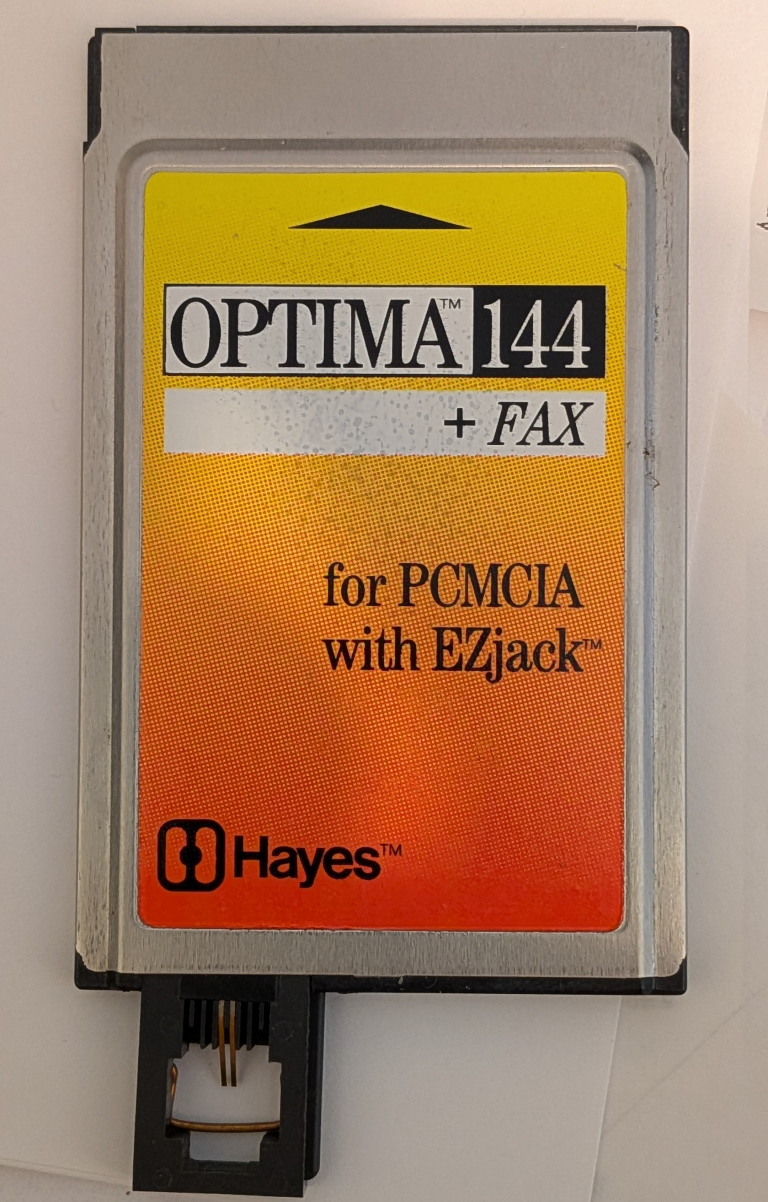
I plugged it in to the Laptop of Theseus, my old Dell Latitude running Debian 13.
Nothing happened, of course.
So, I started searching for "PCMCIA modem", and was directed to install pcmciautils, from a community forum covered in moss and cobwebs, because when was the last time anyone searched for PCMCIA?
For luck, I ejected and reinserted the modem. There's no visible indication that anything changed, but the runes told me to run:
hwinfo --modem
which returned:
47: Serial 00.0: 10200 Modem
  [Created at modem.447]
  Unique ID: Fyby.KM1shMXflFC
  Parent ID: S_Uw.3fyvFV+mbWD
  Hardware Class: modem
  Model: "AT Modem"
  Vendor: int 0x2000 "Unknown"
  Device: int 0x0001 "AT Modem"
  Device File: /dev/ttyS0
  Speed: 115.2 kbps
  Init1: ATZ
  Init2: AT Q0 V1 E1 S0=0 &C1 &D2 +FCLASS=0
  Config Status: cfg=new, avail=yes, need=no, active=unknown
  Attached to: #32 (Serial controller)
Okay! Now, onto a fax client.
More searching pointed me to Hylafax, but a cursory examination showed it to be way overkill. I didn't need a fax server, just something that could send one.
Adding "simple" to my query resulted in efax, which installed without issue.
I then went to test it, but despite specifying -d/dev/ttyS0 on the command line, efax failed because it was trying /dev/modem. It was suggested to create a symlink to the actual device with:
sudo ln -s /dev/ttyS0 /dev/modem
Now, I had to prepare the actual document to fax, which had to be in "TIFF Group 3" format.
Fortunately, Ghostscript, which is apparently included by default in Trixie, can directly convert PDF files to TIFF(G3):
gs -dNOPAUSE -dBATCH -dBlackText -SDEVICE=tiffg3 -sOutputFile=page.p%0d [inputFile.pdf]
Efax requires that each page be a separate file. For multipage docs, Ghostscript helpfully generates individual files, and the OutputFile parameter accepts C format strings for the page numbering.
I used LibreOffice Writer to whip up a cover page, which I then output as a PDF by printing to destination "Print to File...".
Then I had Ghostscript batch convert the cover sheet, and the two other PDFs (both of which were two pages long) to send:
gs -dNOPAUSE -dBATCH -dBlackText -SDEVICE=tiffg3 -sOutputFile=myfax.p%d coversheet.pdf firstdoc.pdf seconddoc.pdf
The -dBATCH option causes Ghostscript to process the files, then exit. If omitted, it leaves you at the GS> prompt.
-dBlackText converts any colored text in the PDF to black, which is better than trying to send grayscaled dithering via fax.
The result was five files:
myfax.p01 myfax.p02 myfax.p03 myfax.p04 myfax.p05
Now it was time to test sending the fax:
$ sudo efax -t12125551212 myfax.p01
efax: Tue Feb 24 14:34:07 2026 efax v 0.9a-001114 Copyright 1999 Ed Casas
efax: Tue Feb 24 14:34:07 2026 efax v 0.9a-001114 Copyright 1999 Ed Casas
efax: 34:07 compiled Oct 24 2024 18:25:43
efax: 34:07 opened /dev/modem
efax: 34:08 using 04-00770-417 028 PASS Hayes Microcomputer Products, Inc. OPTIMA 144 + FAX for PCMCIA with EZ in class 2
efax: 34:09 dialing 12125551212
efax: 34:15 Error: dial command failed
efax: 34:15 failed -> myfax.p01
efax: 34:15 done, returning 2 (unrecoverable error)
Efax found the modem without trouble, and even did a better job identifying it than hwinfo did.
Sudo is required because my user account doesn't have permission to open /dev/modem (/dev/ttyS0), but that's a problem for another day.
The error at the end was expected, because I still hadn't connected the modem to a phone line!
The Tricky Part
My neighbor's landline was disconnected for the winter.
But we all live in an old converted mansion that dates from the birth of the Ford Model T.
My place is on the third floor, in what used to be the servant's quarters.
Now, the original Lady of the House had an Otis Elevator installed in the 1940's, which still works and we keep maintained.
And that elevator, by code, has an emergency telephone, connected by a landline.
I took the Laptop of Theseus down to the basement, where the telephone demarcation point is.
I also happened to have a silver satin RJ-11 phone cord in my collection, and the Network Interface Device for the elevator phone has a modular jack.
I plugged into the EZjack™ and the NID, and balanced the laptop on one hand while issuing the complete efax command:
sudo efax -t12125551212 myfax.p01 myfax.p02 myfax.p03 myfax.p04 myfax.p05
efax: Mon Feb 23 17:47:14 2026 efax v 0.9a-001114 Copyright 1999 Ed Casas
efax: Mon Feb 23 17:47:14 2026 efax v 0.9a-001114 Copyright 1999 Ed Casas
efax: 47:14 compiled Oct 24 2024 18:25:43
efax: 47:14 opened /dev/modem
efax: 47:15 using 04-00770-417 028 PASS Hayes Microcomputer Products, Inc. OPTIMA 144 + FAX for PCMCIA with EZ in class 2
efax: 47:15 dialing 12125551212
efax: 47:42 remote ID -> "          2125551212"
efax: 47:42 connected
efax: 47:50 session 196lpi 14.4kbps 8.5"/215mm  any   1D    -     -  0ms
efax: 47:50 header:[Mon 23 Feb 2026 05:47:14 PM EST                        P. 1]
efax: 47:57 Warning: EOF before RTC
efax: 48:01 sent 20+2155 lines, 17139+0 bytes, 11 s  12464 bps
efax: 48:05 sent -> myfax.p01
efax: 48:06 header:[Mon 23 Feb 2026 05:47:14 PM EST                        P. 2]
efax: 48:30 Warning: EOF before RTC
efax: 48:36 sent 20+2155 lines, 52786+0 bytes, 30 s  14076 bps
efax: 48:41 sent -> myfax.p02
efax: 48:41 header:[Mon 23 Feb 2026 05:47:14 PM EST                        P. 3]
efax: 48:50 Warning: EOF before RTC
efax: 48:54 sent 20+2155 lines, 21144+0 bytes, 13 s  13011 bps
efax: 48:58 sent -> myfax.p03
efax: 48:59 header:[Mon 23 Feb 2026 05:47:14 PM EST                        P. 4]
efax: 49:17 Warning: EOF before RTC
efax: 49:23 sent 20+2155 lines, 40675+0 bytes, 24 s  13558 bps
efax: 49:27 sent -> myfax.p04
efax: 49:27 header:[Mon 23 Feb 2026 05:47:14 PM EST                        P. 5]
efax: 49:31 Warning: EOF before RTC
efax: 49:33 sent 20+2155 lines, 8375+0 bytes, 6 s  11166 bps
efax: 49:39 sent -> myfax.p05
efax: 49:39 done, returning 0 (success)
(SUCCESS).
I did a search for those "EOF before RTC" warning, and found this on a Fedora forum post from 2013:
Ed Casas [the author of efax!!!] replied when i emailed
"The warning means that the software that created the fax file (presumably ghostscript in this case) did not append the 'RTC' sequence
 to the end of the image data. efax (and/or the Class 2 modem) will append the RTC sequence itself.
 This is not really a bug in ghostscript as there is no standard for fax image files."
It only took about four hours, but I actually succeeded in sending a fax.
Since it was after office hours, I called the next day, and the office confirmed receiving it.
That's some tasty mammoth.